
Vim
I’m assuming you’d rather not compile Vim for Windows yourself. I don’t blame you. I tried it and it’s a nightmare.
These are manual steps, unfortunately. 🙁
For the best vim experience you should get the version compiled with Ruby and Python support.
Ruby and Python support does not necessarily mean that you will be coding in Ruby or Python, but many of the plugins that you will want to use require vim integration with Ruby and Python.
These instructions assume you are working in a Powershell console and that Chocolatey is installed.
Install Ruby
choco install ruby -Version 2.0.0.59800
If you need other version of ruby, go ahead and install them now.
Uru
You only need to install uru if you are using multiple rubies. Rvm does not work on Windows and Pik is no longer supported. Uru works fine.
You’ll need to add your ruby installations to uru using
uru admin add /path/to/ruby/bin
Installing Python
choco install Python2
Install Vim
Now you are ready to install vim.
Unfortunately, the version available on Chocolately.org is hard to get to work with Ruby and Python on Windows.
However, Alexander Shukaev (Haroogan) has compiled a version that works nicely.
Extract the zip file where you want it and make sure the location of vim.exe is in the path before any other vims on your system (for example, if you have msysgit installed).
Verification
If this works, you should be able to execute the following commands in vim.
:echo has('ruby') => 1

:echo has('python') => 1
Install .vimrc
I keep my .vimrc file as a gist.
I clone it into my C:\git directory.
git clone https://gist.github.com/crmckenzie/4913add34cd30abd4b93 vimrc
Then I create a symlink from my $HOME directory to the vimrc file. This allows me to maintain the file across machines using git as a synchronization tool.
From powershell
cmd /C mklink .vimrc C:\git\vimrc\.vimrc
The “cmd /C” section is necessary in Powershell because not all cmd.exe commands have been ported yet.
Install Vundle
Vundle is a package manager for Vim. It uses github as a package source. This is about as easy as it gets 🙂
git clone https://github.com/gmarik/Vundle.vim.git ~/.vim/bundle/Vundle.vim
Install Bundles
Open vim and run
:BundleInstall
This should download the bundles specified in .vimrc
I’ll maintain this documentation in my configure-win-dev-workstation repo.
Destiny is a great game. It is getting a lot of complaints due to some obvious failures such as not having enough content, lacking LFG or match-making mechanics for the more difficult missions, and not having a lot of character customization options. These are all true and valid criticisms, but I still find myself playing the game a LOT.
Recently I’ve found myself focusing on another kind of failure in the game. These are user-experience failures. I thought that it might be fun and useful to clearly identify them because some of the principles involved may be useful in other kinds of software.
Orbit
Destiny is constructed as a series of play areas where you can do different things. There are areas with missions and enemies (Venus, Earth, the Moon, and Mars), a safe-zone on Earth called The Tower in which you can trade with merchants and receive bounties, and Orbit where you can see all these areas and decide where you want to go next.
Orbit is useless.
It should not be in the game.
Orbit basically lets me look at a map of places to go, select one, and go there. This would be fine if I didn’t have to pay the cost of load-time in order to transition from one area to another. If I’m on Earth and I want to turn in some bounties and then go to Mars, I have to:
1) go to orbit (load time)
2) go to the Tower (load time)
3) go back to orbit (load time)
4) go to Mars (load time)
Instead I should be able to:
1) go to the Tower (load time)
2) Travel to Mars (load time)
In fact, I should be able to travel directly from any one area to any other area without having to load a special context in order to see a map. If I want to skip the Tower, I should just be able to:
1) go to Mars (load time)
Why is orbit even a thing? Why can’t I access the map from any location? Why can’t I stay in the world I’m in after a mission?
The Sin: Wasting User’s Time
Destiny shoehorns the player into a workflow that doesn’t make sense for the player and wastes their time. If there is a technical reason for this workflow, Bungie should solve the underlying problem in such a way that the user’s play flow is streamlined.
Joining and Leaving a Fireteam.
Let’s say I’m in the Tower and I’m invited to join a fire team. Let’s stipulate further that the fireteam is also in the Tower. The game
1) immediately takes me to orbit
2) and takes me back to the Tower.
WTF?
Likewise, if I’m in a fire team and I leave it the game almost always takes me out of where I am and sends me to Orbit (which as I’ve already stated is useless).
The problem here is likely technical (but it’s solvable). I imagine that the issue is that I’m in the The Tower on a different server than the rest of the fireteam. Bungie has chosen to solve this problem by taking me out of the current server and completely reloading a new context on the new server with the same fireteam. Other MMO’s have faced this problem and solved it without forcing the player to reload the same environment they’re already in.
The Sin: Wasting User’s Time
Destiny is forcing the player to endure the consequences of their bad design decisions.
Cut Scenes
OMFG I can’t believe I’m even having to say this so late in the development of video games. Unskippable cut-scenes are the 2nd to worst sin in games. The first is unskippable cut scenes that start immediately before an epic battle which will likely kill the hero many times before the player succeeds. Having to watch the same cut-scene over and over between attempts frustrates the player and drains enjoyment out of the game-playing experience. Some games are so bad with this that I have stopped playing them altogether.
Attention Game Developers–I’m interested and willing to watch your cut-scenes once. I know you put a lot of work into them and want the players to see them and enjoy them. However, the game is supposed to be fun, and watching the same @$#*$_)(*!@&)(*&$ movie over and over again makes the game not fun. Please for the love of all that is bright and good in the world, stop!
If I was a professional game reviewer, I would immediately dock 20% off of the game score for doing this once. In Destiny, no cut scenes are skippable. Gah!
The Sin: Wasting User’s Time
Failing to understand what the player wants out of your game and instead pushing your own agenda on the player leaves a bad taste in the player’s mouth.
Summary
Hmm, it looks like all of these problems are a variant of the same thing. The user’s time is valuable and the workflows you design for your software should be designed to get user’s where they want to go as fast as possible.
Destiny is a great game. It’s a well-executed MMOFPS and I’m still enjoying playing it. However, it has some serious warts. All it will take is a more competent competitor to enter this space to get me to play (and recommend to my friends) something else.
I gave 2 presentations at Seattle Code Camp today.
The first was a talk about our internship program. I’m still trying to start the conversation on this one. So far it appears no one is talking about this topic. My powerpoint is here: Scaling Craftsmanship Through Apprenticeship. It’s not much more than just a memory-jog for me, but they were asked for so I’m posting them.
The second talk was about Unit Testing Your Javascript. This one sort of went sideways when Chrome refused to load my demo site. That was a challenge! Still, I think it went off okay. The unfortunate reality is that unit testing in Javascript is still pretty hard. It still feels like a lot of duct tape and baling work to make it work. That said, I’ve put together a demo application that shows how we do it at work.
Thanks to everyone who attended my presentations. I hope you enjoyed them!
Overall
Guitar Practiced Perfectly is a piece of software that helps a guitarist manage and plan practice routines. It includes 300 or so practice routines out of the box. Routines can be organized into sessions. Sessions can be organized arbitrarily, but the software supports daily sessions. It’s written in Adobe Air so it will run on Mac and PC. I’m running on Windows 8 64-bit.
I’ve only used the software for one practice session so far. The overall effort is very good. As far as I know, it’s the only software of its kind. At $50 US, it’s a little pricey to buy without a trial.
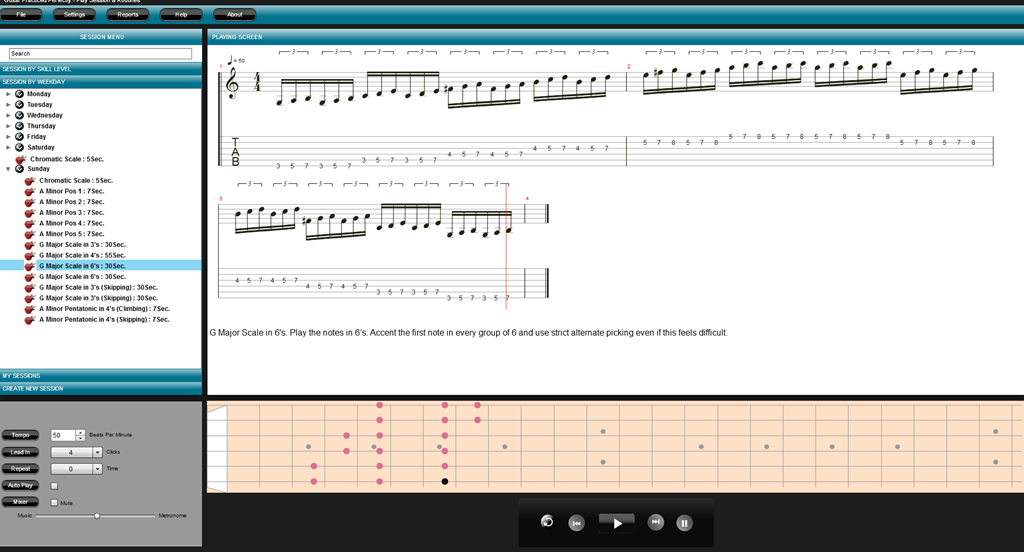
Missing Features
- I should be able to create my own routines. This is a huge gap in the software. For example, I’d like a version of the C major pentatonic that includes the minor 3rd and the diminished 7th. Or I’d like a routine in which I play a scale through ascending keys.
- When I drag/drop an element between tree elements, I should be able to choose "Copy" or "Move."
- In addition to being able to create a new routine, I’d like to be able to clone an existing routine and modify it.
Bugs
- I’ve noticed that if I’m playing an exercise and change the tempo then it stops playing sound. I have to close/reopen the software to get it to play sound again.
- Drag/Drop a routine within a session doesn’t work. This makes changing the order of the routines hard.
Usability Problems
- The use of accordion style controls for the session menus makes it hard to understand that you can drag/drop exercises between accordion tabs. In general, accordions should not be used when data is shared across panels.
- The fact that the screen elements are static is irritating. It would be nicer if I could move things around. The best UI I’ve seen for this sort of thing is in Microsoft Visual Studio. Each panel is draggable and dockable on its own. I don’t know if Adobe Air gives you this kind of flexibility, but it would be nice, and it would make the drag/drop operations easier to manage as "Session by Weekday" could be docked to a different screen area than "Session by Skill Level."
- The user should be able to drag/drop more than one exercise at a time. I found this annoying when I was trying to drag all of a certain category of exercise to my Sunday routine. I had to do them one at a time.
- The labels that control Tempo, Lead In, Repeat, etc react to the mouse as if they were buttons. Clicking them doesn’t do anything. This is confusing. They should either just be labels, or open some kind of advanced editing screen.
- Having to choose between Music and Metronome is painful. They should have independent volume controls.The existing either-or functionality forces me to into a tricky volume balancing act with my amp.
- Help->About menu should include the software version. The fact that the software version is missing from the UI makes it hard to tell if you are running the latest.
- The main window should include a standard control box for changing screen size, minimize, and maximize functionality.
- I think it should be impossible to delete system-defined routines and sessions. This is scary functionality as I could get rid of something very useful.
Overall
I like Guitar Practiced Perfectly very much and I’ll get a lot of use out of it. However, it’s not the software I was hoping it was. The lack of routine-creation and editing functionality means it misses the mark by quite a large margin. Some of the UI constraints make working with sessions very hard. For an intermediate player such as myself, it will definitely help me take my playing to the next level. However, I’ll not be able to use it to integrate my teacher’s lessons into my daily practice.
Final Score
70%
This post is about concretizing the relationship between two abstract design principles and providing a piece of practical advice
The goal of the Liskov Substitution Principle is to make sure that subclasses behave as their superclass parents. The “Is-A” relationship is superceeded by the “Behaves-As-A” relationship. By observing the LSP we enable looser coupling by not making clients of the superclass catalog knowledge of the subclasses.
Implicit in the discussion around LSP is that you are actually consuming the abstract type instead of the concrete types. From the wikipedia entry on the Dependency Inversion Principle:
A. High-level modules should not depend on low-level modules. Both should depend on abstractions.
B. Abstractions should not depend upon details. Details should depend upon abstractions.
Basically, you want the clients of your code to depend on the most abstract possible type. So, as a simple heuristic when you’re writing methods, try using the most abstract type that the clients of your code can use without type casting or reflection. If you’re using ReSharper (which I highly recommend) you’ll get these suggestions automatically–but this is an easy heuristic to apply when you’re writing the method in the first place.
In general, favor interfaces over base classes and base classes over sub-classes (Interfaces are a much weaker coupling than inheritance).
Happy Coding!
Add this script to your powershell profile. If you don’t know where your powershell profile is, open a powershell session and type $profile and press <Enter>. In Windows 7, you can run powershell from the current folder by typing powershell in the address bar of windows explorer.
	#Set environment variables for Visual Studio Command Prompt
	$vspath = (get-childitem env:VS100COMNTOOLS).Value
	$vsbatchfile = "vsvars32.bat";
	$vsfullpath = [System.IO.Path]::Combine($vspath, $vsbatchfile);

	#$_ shortcut represents arguments
	pushd $vspath
	cmd /c $vsfullpath + "&set" |
	foreach {
	  if ($_ -match “=”) {
		$v = $_.split(“=”);
		set-item -force -path "ENV:\$($v[0])"  -value "$($v[1])"
	  }
	}
	popd
	write-host "Visual Studio 2010 Command Prompt variables set." -ForegroundColor Red
I’ve been Internet-less for a few days and it’s been killing me. Internet is like coffee—it makes the world go round!
I’ve made a few updates to Yodelay that I wanted to tell you about.
First, I added an ASP .NET MVC project. I wanted to see if I could use the MVVM pattern in ASP .NET MVC. I’m not completely happy with my implementation, and the UI is kind of rough, but it works. I’ll work on cleaning it up later.
Second, I added a library for non-attribute-based validation. My problem with validation frameworks that rely on attributes is that I don’t always have access to the code for the classes I need to create business rules for. The new library uses a fluent API to configure rules for classes and properties.
Example:
ConfigureRules.ForType<BusinessObject>()
    .If(e => e.Id > 0)
        .Property(e => e.Name)
        .Must.Not().BeNull();
var testObject = new BusinessObject() {Id = 1, Name = "Testing" };
Rules.Enforce(testObject);
Third, I added some extension methods for the Range class which allow the developer to test for adjacent, intersecting, and disjoint ranges. Further, the range API will now find gaps in lists of ranges.
Finally, I removed the assembly signing. When I added the key files before, I password-protected them. This makes it hard for people who download the source code to compile it. I’ve removed all assembly-signing for the short term. When I”m ready to build and installation package, I’ll resign the files without password protection.
So I spoke at GSP Developers tonight on TDD. It went well, though I was a bit nervous. I got through the example I chose with less code and fewer tests than I had with any previous attempt, though I still took about the same amount of time. I enjoyed the questions from the audience, and the event organizer made some great observations as well. I think I might enjoy doing something more long-form, such as a mini code-camp for teaching TDD.
Editors Note: I have since changed my mind on this post as I have developed and run a successful internship program for many years now. However, I will preserve this as-is for posterity.
Read this post from Uncle Bob, and be sure to watch the video—that’s the scary part.
I take issue with Uncle Bob’s idea of internship. Having Senior Developers mentor interns can create a culture of inbred, non-innovative practices. The temptation is to think that you can teach smart development practices. All you can teach is a litany of concretes. The junior developer has to turn their brain on to grasp the principles involved. In short, I don’t think Uncle Bob’s solution is that new, or that it would solve any of the problems he describes.
I think the problem is deeper than just lack of skill or training. What software development needs is a revolution in values. We as developers need to value high-quality, unit-tested, organized, clean code. We need to value the drive to excellence, not just the willingness but the desire to learn, and make room for innovation. Software development managers need to refuse to tolerate anything less. We need to stop sacrificing design and test to the altar of the arbitrary dead-line. Fortunately, we don’t need to start that revolution as it is already under way—Uncle Bob’s post being a recent shot fired in that war.
Update:
The link to Uncle Bob’s original url moved. I updated it.
I was interested to read Roy Osherove’s account of his worst team leaders recently. Jason Crawford writes about what he thinks makes good team managers. They are not talking about the same role I think.
Roy is talking about a technical lead on a team of developers and his basic problem is the technical lead’s perceived lack of or interest in technical ability. His criticisms fall into basically two categories: training, and judgment. He wants a technical lead to help make him a better developer by judging it. A lead that refuses to judge is no lead at all.
Jason Crawford draws portraits of three kinds of managers, but the best, he says, focus on communicating values. He is not suggesting that a good project manager should moralize to his employees, but rather that the PM should have a clear idea of the values of the company and ensure that the work his reports do conforms to those values. If we apply this to Roy’s technical lead, Roy’s technical lead should value technical ability to the point that he would be willing to point out mistakes and help the developer become better at his job.
I recently had occasion to write a recommendation for a former Project Manager. With permisssion, I’ll reprint the entire recommendation:
“Maggie Roberts was a great project manager. She was great at communicating with both technical and non-technical personnel. She knew enough about the technical work to describe the expected results as well as the goal she hoped to accomplish with the results, and then she got out of the way and let me deliver the results to her. When I had a better idea of how to get the desired results, she allowed me to pursue it.
My favorite thing about working with Maggie was her directness and the clarity of her expectations. She was never shy about indicating what was and was not good about the work I turned in. Her criticism was never cruel or directed toward me as a person, but targeted the work I turned in and its relationship to our client. She was not shy with her praise either. She had the same directness with pointing out great things I did as she did with errors. She always related both praise and criticism directly to how my performance affected the client. By making sure I had a clear understanding of our goals, and by being so clear about judging my work, she encouraged me to look for more creative ways of meeting our goals. She made me feel like both a technician and a partner in our quest to save our client money. Working with Maggie was a challenge because of the high standards she set, and a pleasure because the standards were clear, and she made sure I had the tools I needed to meet them. I can honestly say that I grew as a technician under her leadership.”
Maggie was not a technical lead, but a PM. In that role, she communicated values (save the client money, show each step of the work) very clearly, and she demanded quality. I had never worked with SQL Server before working with Maggie, but in six months I got two years of experience. When I created an automated Excel spreadsheet to retrieve data and perform the formatting we were doing by hand, she was very free with her praise.
